info@autonexit.com

Working Hours: 9:00 AM to 5:00 PM

Download SIMOTION SCOUT V5.6.1 Free + Installation Guide

Download SIMOTION SCOUT V5.6.1 Free + Installation Guide

SIMOTION SCOUT is a comprehensive engineering software from Siemens, specifically designed for configuring, programming, testing, and commissioning motion control systems. As the central engineering tool within the SIMOTION motion control platform, it offers an integrated solution for a wide range of industrial automation applications.

Key Capabilities of SIMOTION SCOUT

1. Easy and Efficient Configuration

SIMOTION SCOUT provides an intuitive user interface and powerful engineering tools that greatly simplify the configuration process. The software automatically detects drives and their components, reducing the need for deep control-engineering expertise. This streamlined workflow allows engineers to set up motion control systems quickly and accurately.

2. Flexible Programming Environment

The software supports the standard IEC 61131-3 programming languages, enabling users to define control logic in a flexible and familiar environment. It also includes a wide range of predefined function blocks and libraries that simplify the implementation of common motion-control tasks, accelerating development while ensuring consistency and reliability.

3. Precise Testing and Commissioning Tools

SIMOTION SCOUT offers comprehensive tools for simulation, parameter tuning, and troubleshooting. Users can simulate system behavior, adjust drive and motion parameters, and perform detailed diagnostics to ensure optimal system performance before deployment.

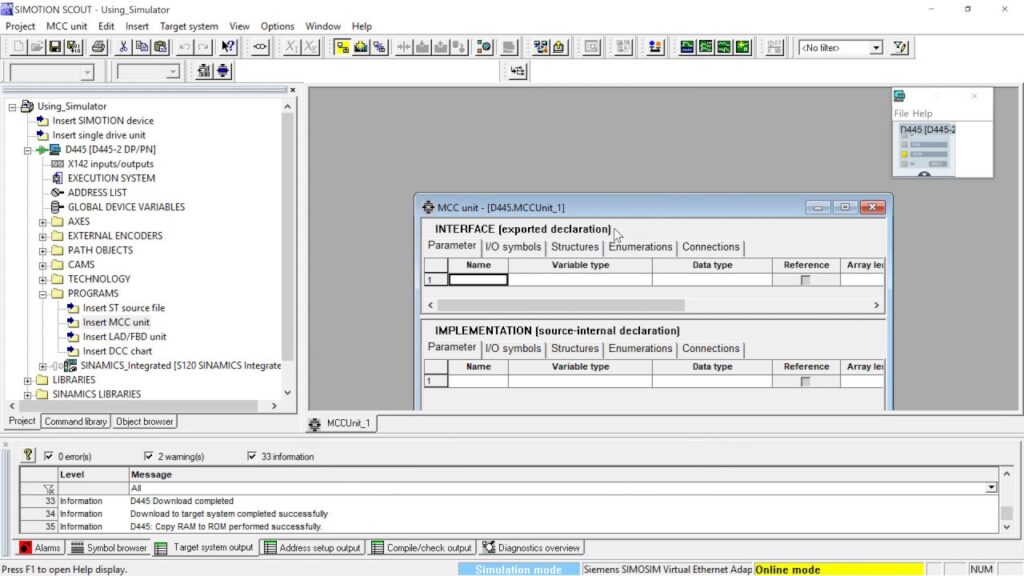
SIMOTION SCOUT

Benefits of Using SIMOTION SCOUT

Reduced Engineering Time and Cost

By simplifying configuration, programming, and testing, SIMOTION SCOUT significantly reduces the engineering effort required to build and commission motion control systems. This leads to faster project execution and lower overall costs.

Enhanced Accuracy and Performance

With precise commissioning and diagnostic tools, users can achieve high-performance and highly accurate motion control, ensuring that machines operate smoothly and efficiently.

High Reliability and Stability

Backed by Siemens’ strong technology ecosystem, SIMOTION SCOUT is a robust and reliable engineering environment. Its stability and long-term support make it a trusted choice for industrial applications requiring consistent motion performance.

Applications of SIMOTION SCOUT

SIMOTION SCOUT is widely used across multiple sectors of industrial automation, offering precise and reliable motion-control engineering tools. Its flexibility and advanced capabilities make it suitable for a broad range of machine and production environments. Below are the key industries where SIMOTION SCOUT plays a critical role:

1. Machinery and Equipment Manufacturing

SIMOTION SCOUT is extensively used in the machinery sector to control the motion of conveyors, robots, machine tools, and various mechanical systems. Its advanced programming and diagnostic tools ensure smooth operation, high accuracy, and reliable performance in complex machine motion scenarios.

2. Packaging Industry

In the packaging industry, SIMOTION SCOUT enables precise control of packaging robots, filling systems, dosing units, and synchronized motion processes. This results in increased production speed, reduced waste, and higher packaging accuracy—critical factors for modern automated packaging lines.

3. Printing Industry

SIMOTION SCOUT is used to control the motion of printers, cutters, rollers, and other high-precision equipment in printing applications. With its ability to synchronize multi-axis motion, it ensures stable operation and consistent print quality even in high-speed production environments.

4. Food & Beverage Industry

In food and beverage production, SIMOTION SCOUT supports the control of conveyors, pick-and-place robots, filling lines, and automated sorting systems. Its reliability and speed make it ideal for environments where hygiene, accuracy, and continuous operation are essential.

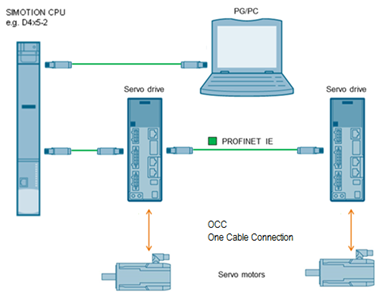
Configuring technology objects with SIMOTION SCOUT TIA and SINAMICS S210

Installation and Activation Guide for SIMOTION SCOUT

Below is a step-by-step guide to installing and activating SIMOTION SCOUT. These steps ensure proper setup and a smooth engineering experience:

Step 1: Disable Antivirus Software

Before starting the installation, completely disable your antivirus application. Some antivirus tools may detect license files or installation components as false positives, which can interrupt or block the setup process.

Step 2: Install the Software

Run the SIMOTION SCOUT installer.
When the license-related window appears at the end of the installation, simply click “Skip” to continue without entering a license at that stage.

Step 3: Apply the License (Crack Method)

Navigate to the Crack folder and run the file Slim_EKB_Install.
From the displayed list, select the required licenses and click “Install”.
This step activates SIMOTION SCOUT and unlocks all engineering features.

Step 4: Successful Activation

Congratulations! SIMOTION SCOUT is now fully installed and ready to use. You can proceed with configuring drives, programming motion logic, or commissioning your automation system.

Download SIMOTION SCOUT

The password: autonexit.com

❓ Having Trouble with Installation?

If you cannot install or activate the software and need a professional paid remote setup, our team can complete the installation and activation for you through a secure one-time session. This is a premium technical service (not free) designed for users who want a fast, reliable, and guaranteed solution without wasting time.
To request this service, please fill out the form below. We will review your request and contact you by email with the service details, availability, and payment instructions.

5/5 (1 Review)
Liam Siahtiri

Liam Siahtiri

I’m passionate about PLCs and industrial automation, with a focus on complex programming, communication protocols, and SCADA systems. My goal is to develop practical, project-based training to fill the gap in industry education and give back to the field that shaped my growth. I hold a Master’s degree in Electrical Power Engineering.

Subscribe
Notify of
guest
1 Comment
Oldest
Newest Most Voted
Inline Feedbacks
View all comments
Sergio
Sergio
20 days ago

The file ask for a password, i cant extract the files.

Recently comments
  • Raja : Good day EhsanThanks for uploading. May i have the password to the uploaded rar file. Regards Raja
  • Liam Siahtiri : Hi, It's: autonexit.com
  • MEETKUMAR Sandipbhai PATEL : Good day Ehsan . Thanks for uploading. I don't know why I am not able to install and extract a folder can you guide me plz?